sábado, 13 de julio de 2019

Operadores Para Microsoft Access


Tabla de operadores

Un operador es un signo o símbolo que especifica el tipo de cálculo que se realiza en una expresión. Hay operadores matemáticos, de comparación, lógicos y de referencia. Access admite diversos operadores, incluidos los operadores aritméticos como +, -, de multiplicación (*) y división (/), además de los operadores de comparación para comparar valores, los operadores de texto para concatenar texto y los operadores lógicos para determinar valores verdadero o falsos. En este artículo se proporciona información sobre el uso de estos operadores.
Nota: Desde Access 2010, el Generador de expresiones tiene IntelliSense, para que pueda ver qué argumentos requiere la expresión.

En este artículo

Operadores aritméticos

Los operadores aritméticos se usan para calcular un valor de dos o más números, o cambiar el signo de un número de positivo a negativo o viceversa.
Operador
Propósito
Ejemplo
+
Suma dos números.
[Subtotal]+[ImpuestoSobreVentas]
-
Busca la diferencia entre dos números o indica el valor negativo de un número.
[Precio]-[Descuento]
*
Multiplica dos números.
[Cantidad]*[Precio]
/
Divide el primer número entre el segundo.
[Total]/[RecuentoDeElementos]
\
Redondea ambos números a enteros, divide el primer número entre el segundo y, después, trunca el resultado a un entero.
[Registradas]\[Salas]
Resto
Divide el primer número entre el segundo y después devuelve únicamente el resto.
[Registradas] Resto [Salas]
^
Eleva un número a la potencia de un exponente.
Número ^ Exponente

Operadores de comparación

Los operadores de comparación se usan para comparar valores y devolver un resultado que sea True, False o Null.
Operador
Propósito
Ejemplo
<
Devuelve True si el primer valor es menor que el segundo valor.
Valor1 < Valor2
<=
Devuelve True si el primer valor es menor o igual que el segundo valor.
Valor1 <= Valor2
>
Devuelve True si el primer valor es mayor que el segundo valor.
Valor1 > Valor2
>=
Devuelve True si el primer valor es mayor o igual que el segundo valor.
Valor1 >= Valor2
=
Devuelve True si el primer valor es igual al segundo valor.
Valor1 = Valor2
<>
Devuelve True si el primer valor no es igual al segundo valor.
Valor1 <> Valor2
Nota: En todos los casos, si el primer valor o el segundo es Null, entonces el resultado, también es Null. Dado que un valor Null representa un valor desconocido, el resultado de cualquier comparación con un valor Null también es desconocido.

Operadores lógicos

Los operadores lógicos se usan para combinar dos valores Booleanos y devolver un resultado verdadero, falso o nulo. Los operadores lógicos también se denominan operadores Booleanos.
Operador
Propósito
Ejemplo
Y
Devuelve True cuando Expresión1 y Expresión2 son verdaderas.
Expresión1 Y Expresión2
O
Devuelve True cuando Expresión1 o Expresión2 es verdadera.
Expresión1 O Expresión2
Eqv
Devuelve True cuando tanto Expresión1 como Expresión2 son verdaderas, o cuando Expresión1 y Expresión2 son falsas.
Expresión1 Eqv Expresión2
No
Devuelve True cuando la Expresión no es verdadera.
No Expresión
Xor
Devuelve True si Expresión1 es verdadera o Expresión2 es verdadera, pero no ambas.
Expresión1 Xor Expresión2

Operadores de concatenación

Los operadores de concatenación se usan para combinar dos valores de texto en uno.
Operador
Propósito
Ejemplo
&
Combina dos cadenas para formar una.
cadena1 & cadena2
+
Combina dos cadenas para formar una y propaga los valores Null (si un valor es Null, toda la expresión se evalúa como Null).
cadena1 + cadena2

Operadores especiales

Los operadores especiales se usan para devolver un resultado True o False como se describe en la tabla siguiente.
Operador
Propósito
Ejemplo
Is Null o Is Not Null
Determina si un valor es nulo o no nulo.
Campo1 Is Not Null
Like "patrón"
Compara valores de cadena mediante los operadores de comodín ? y *.
Campo1 Like "instruct*"
Between valor1 And valor2
Determina si un valor numérico o de fecha se encuentra dentro de un rango.
Campo1 Between 1 And 10
- O -
Campo1 Between #01-07-07# Y #31-12-07#
In(valor1,valor2...)
Determina si un valor se encuentra dentro de un conjunto de valores.
Campo1 In ("rojo","verde","azul")
- O - 
Campo1 In (1,5,7,9)

Conectar una Base de datos MySQL con Java y Netbeans

 Paso 1

Primero necesitamos tener instalado en nuestra PC el Netbeans, java y MySQL por supuesto.

Paso 2

Descargar el MySQL Java Conector, descomprimirlo y ubicarlo en una carpeta de fácil acceso.

Paso 3

Ahora vamos al Netbeans y creamos un nuevo proyecto, le ponemos un nombre y seleccionamos para crear la clase principal por defecto.
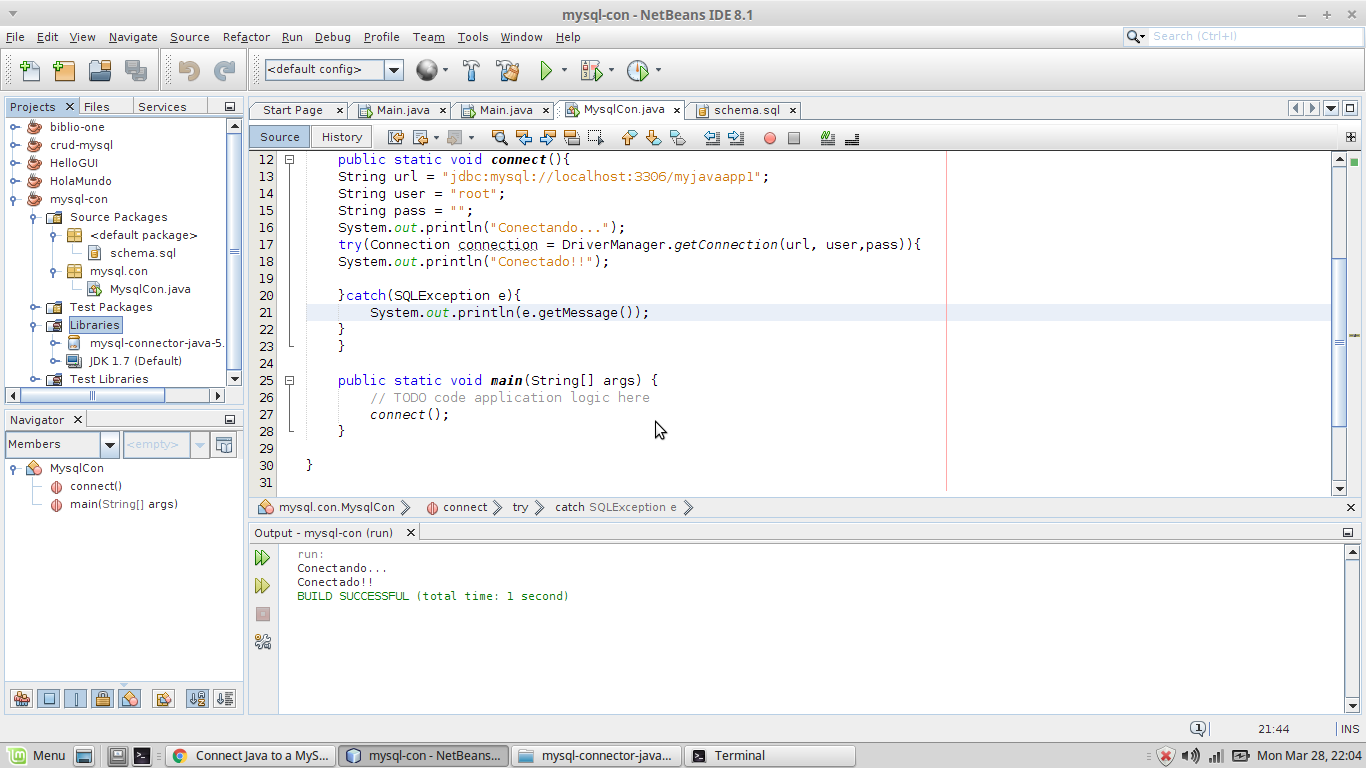
En mi caso el nombre de mi proyecto es mysql-con y la clase por defecto que se creo fue MysqlCon.java.

Paso 4

En el menu de la derecha del Netbeans buscamos en el arbol de proyectos, seleccionamos el proyecto actual y vamos a la carpeta de librerías, le damos click derecho y buscamos el MySQL Java Conector de donde lo guardamos en el paso 2, seleccionamos el archivo .jar.

Paso 5

Ahora vamos a escribir el código de nuestra función de conexión a la base de datos:
[code language=”java”]
public static void connect(){
String url = "jdbc:mysql://localhost:3306/myjavaapp1";
String user = "root";
String pass = "";
System.out.println("Conectando…");
try(Connection connection = DriverManager.getConnection(url, user,pass)){
System.out.println("Conectado!!");
}catch(SQLException e){
System.out.println(e.getMessage());
}
}
[/code]
En tu caso debes modificar el valor de las variables url, user y password.
La variable url equivale a la ubicacion del servidor de la base de datos, en este caso en localhost en el puerto 3306 y despues una diagonal separando el nombre de la base de datos.

Paso 6

Crear la base de datos.
PAra ello debemos recurrir a una consola de comandos o algun gestor visual como MySQLWordBench o el mismisimo PHPMyAdmin.
El codigo SQL de la base de datos en cuestión es el siguiente.
[code language=”sql”]
create database myjavaapp1;
use myjavaapp1;
create table user(
id int not null auto_increment primary key,
username varchar(125) unique,
password varchar(125),
created_at datetime
);
[/code]

Paso 7

Ahora que ya hemos cubierto los pasos necesarios vamos a ejecutar el proyecto.
Por cierto recuerden agregar una llamada a la funcion connect() dentro de la funcion main() …

mysql1

Paso 8

Despues de la linea donde mandamos a imprimir el texto “Conectado!” podemos usar el codigo siguiente para agregar un usuario:
[code language=”java”]
System.out.println("Insertando …");
Statement s = connection.createStatement();
String query1 = "insert into user (username,password,created_at) value (\"user1\",\"mypassword\",NOW())";
s.executeUpdate(query1);
[/code]
Y seguido de ese podemos usar el siguiente para mostrar o hacer un recorrido de todos los registros de la tabla user.
[code language=”java”]
// vamos a recorrer
String query2 = "select * from user";
ResultSet r = s.executeQuery(query2);
[/code]

miércoles, 29 de mayo de 2019

informacion validad para programar access imprimir

Para crear un boton e imprimir un reporte

DoCmd. OpenReport "NombreReporte", acViewPreview


Crear boton para imprimir un registro actual

DoCmd.OpenReport "NombreInforme",acViewNormal,,"IdFactura = " & Nz(Me.IdFactura,0)

Ejemplo:

Private Sub Comando8_Click()
     DoCmd.OpenReport "Consulta1inf", acViewPreview, , "codigop = " & Nz(Me.codigop.Value, 0)
End Sub


filtrar informacion por un campo

Private Sub Comando9_Click()
        DoCmd.ApplyFilter , "CODIGOP = 2"
End Sub

martes, 19 de septiembre de 2017

form ventana para cambiar titulos y modificar emnsajes


import javax.swing.JOptionPane;

/*
 * To change this license header, choose License Headers in Project Properties.
 * To change this template file, choose Tools | Templates
 * and open the template in the editor.
 */

/**
 *
 * @author SEDUCA
 */
public class Ventana extends javax.swing.JFrame {

    /**
     * Creates new form Ventana
     */
    public Ventana() {
        initComponents();
    }

    /**
     * This method is called from within the constructor to initialize the form.
     * WARNING: Do NOT modify this code. The content of this method is always
     * regenerated by the Form Editor.
     */
    @SuppressWarnings("unchecked")
    // <editor-fold defaultstate="collapsed" desc="Generated Code">                         
    private void initComponents() {

        buttonGroup1 = new javax.swing.ButtonGroup();
        txtntitulo = new javax.swing.JButton();
        txtNuevott = new javax.swing.JTextField();
        txtTA = new javax.swing.JTextField();
        txtMSN = new javax.swing.JTextField();
        jButton2 = new javax.swing.JButton();
        jButton3 = new javax.swing.JButton();
        jButton4 = new javax.swing.JButton();
        jRBinfo = new javax.swing.JRadioButton();
        jRBaviso = new javax.swing.JRadioButton();
        jRBerror = new javax.swing.JRadioButton();
        jLabel1 = new javax.swing.JLabel();
        jLabel2 = new javax.swing.JLabel();

        setDefaultCloseOperation(javax.swing.WindowConstants.EXIT_ON_CLOSE);
        setLocation(new java.awt.Point(400, 200));

        txtntitulo.setLabel("Nuevo Titulo");
        txtntitulo.addActionListener(new java.awt.event.ActionListener() {
            public void actionPerformed(java.awt.event.ActionEvent evt) {
                txtntituloActionPerformed(evt);
            }
        });

        jButton2.setText("Nueva Alerta");
        jButton2.addActionListener(new java.awt.event.ActionListener() {
            public void actionPerformed(java.awt.event.ActionEvent evt) {
                jButton2ActionPerformed(evt);
            }
        });

        jButton3.setText("Borrar");

        jButton4.setText("Salir");
        jButton4.addActionListener(new java.awt.event.ActionListener() {
            public void actionPerformed(java.awt.event.ActionEvent evt) {
                jButton4ActionPerformed(evt);
            }
        });

        buttonGroup1.add(jRBinfo);
        jRBinfo.setText("Info");

        buttonGroup1.add(jRBaviso);
        jRBaviso.setText("Aviso");

        buttonGroup1.add(jRBerror);
        jRBerror.setText("Error");

        jLabel1.setText("Titulo de la Alerta");

        jLabel2.setText("Mensaje de Alerta");

        javax.swing.GroupLayout layout = new javax.swing.GroupLayout(getContentPane());
        getContentPane().setLayout(layout);
        layout.setHorizontalGroup(
            layout.createParallelGroup(javax.swing.GroupLayout.Alignment.LEADING)
            .addGroup(layout.createSequentialGroup()
                .addGap(104, 104, 104)
                .addComponent(jButton3)
                .addPreferredGap(javax.swing.LayoutStyle.ComponentPlacement.RELATED, javax.swing.GroupLayout.DEFAULT_SIZE, Short.MAX_VALUE)
                .addComponent(jButton4)
                .addGap(162, 162, 162))
            .addGroup(layout.createSequentialGroup()
                .addGroup(layout.createParallelGroup(javax.swing.GroupLayout.Alignment.LEADING)
                    .addGroup(layout.createSequentialGroup()
                        .addGap(60, 60, 60)
                        .addComponent(jButton2, javax.swing.GroupLayout.PREFERRED_SIZE, 117, javax.swing.GroupLayout.PREFERRED_SIZE)
                        .addGap(71, 71, 71)
                        .addComponent(jRBinfo)
                        .addGap(18, 18, 18)
                        .addComponent(jRBaviso)
                        .addGap(18, 18, 18)
                        .addComponent(jRBerror))
                    .addGroup(layout.createSequentialGroup()
                        .addGap(40, 40, 40)
                        .addGroup(layout.createParallelGroup(javax.swing.GroupLayout.Alignment.LEADING)
                            .addGroup(layout.createSequentialGroup()
                                .addGroup(layout.createParallelGroup(javax.swing.GroupLayout.Alignment.TRAILING, false)
                                    .addGroup(layout.createSequentialGroup()
                                        .addComponent(jLabel1, javax.swing.GroupLayout.PREFERRED_SIZE, 102, javax.swing.GroupLayout.PREFERRED_SIZE)
                                        .addGap(56, 56, 56))
                                    .addGroup(layout.createSequentialGroup()
                                        .addComponent(txtntitulo, javax.swing.GroupLayout.DEFAULT_SIZE, javax.swing.GroupLayout.DEFAULT_SIZE, Short.MAX_VALUE)
                                        .addGap(21, 21, 21)))
                                .addGroup(layout.createParallelGroup(javax.swing.GroupLayout.Alignment.LEADING)
                                    .addGroup(layout.createSequentialGroup()
                                        .addGap(54, 54, 54)
                                        .addComponent(txtNuevott))
                                    .addGroup(javax.swing.GroupLayout.Alignment.TRAILING, layout.createSequentialGroup()
                                        .addPreferredGap(javax.swing.LayoutStyle.ComponentPlacement.RELATED, 53, Short.MAX_VALUE)
                                        .addComponent(txtTA, javax.swing.GroupLayout.PREFERRED_SIZE, 264, javax.swing.GroupLayout.PREFERRED_SIZE))))
                            .addGroup(layout.createSequentialGroup()
                                .addComponent(jLabel2, javax.swing.GroupLayout.PREFERRED_SIZE, 153, javax.swing.GroupLayout.PREFERRED_SIZE)
                                .addPreferredGap(javax.swing.LayoutStyle.ComponentPlacement.RELATED, javax.swing.GroupLayout.DEFAULT_SIZE, Short.MAX_VALUE)
                                .addComponent(txtMSN, javax.swing.GroupLayout.PREFERRED_SIZE, 264, javax.swing.GroupLayout.PREFERRED_SIZE)))))
                .addGap(88, 88, 88))
        );
        layout.setVerticalGroup(
            layout.createParallelGroup(javax.swing.GroupLayout.Alignment.LEADING)
            .addGroup(layout.createSequentialGroup()
                .addGap(97, 97, 97)
                .addGroup(layout.createParallelGroup(javax.swing.GroupLayout.Alignment.LEADING)
                    .addGroup(layout.createSequentialGroup()
                        .addGap(12, 12, 12)
                        .addComponent(txtNuevott, javax.swing.GroupLayout.PREFERRED_SIZE, javax.swing.GroupLayout.DEFAULT_SIZE, javax.swing.GroupLayout.PREFERRED_SIZE)
                        .addGap(18, 18, 18)
                        .addGroup(layout.createParallelGroup(javax.swing.GroupLayout.Alignment.BASELINE)
                            .addComponent(jLabel1)
                            .addComponent(txtTA, javax.swing.GroupLayout.PREFERRED_SIZE, javax.swing.GroupLayout.DEFAULT_SIZE, javax.swing.GroupLayout.PREFERRED_SIZE)))
                    .addComponent(txtntitulo))
                .addGap(18, 18, 18)
                .addGroup(layout.createParallelGroup(javax.swing.GroupLayout.Alignment.LEADING)
                    .addComponent(txtMSN, javax.swing.GroupLayout.PREFERRED_SIZE, javax.swing.GroupLayout.DEFAULT_SIZE, javax.swing.GroupLayout.PREFERRED_SIZE)
                    .addComponent(jLabel2))
                .addPreferredGap(javax.swing.LayoutStyle.ComponentPlacement.RELATED, 96, Short.MAX_VALUE)
                .addGroup(layout.createParallelGroup(javax.swing.GroupLayout.Alignment.LEADING)
                    .addGroup(javax.swing.GroupLayout.Alignment.TRAILING, layout.createSequentialGroup()
                        .addComponent(jButton2)
                        .addGap(100, 100, 100))
                    .addGroup(javax.swing.GroupLayout.Alignment.TRAILING, layout.createSequentialGroup()
                        .addGroup(layout.createParallelGroup(javax.swing.GroupLayout.Alignment.BASELINE)
                            .addComponent(jRBaviso)
                            .addComponent(jRBerror)
                            .addComponent(jRBinfo))
                        .addGap(78, 78, 78)))
                .addGroup(layout.createParallelGroup(javax.swing.GroupLayout.Alignment.BASELINE)
                    .addComponent(jButton3)
                    .addComponent(jButton4))
                .addGap(46, 46, 46))
        );

        pack();
    }// </editor-fold>                       

    private void txtntituloActionPerformed(java.awt.event.ActionEvent evt) {                                          
        // TODO add your handling code here:
        String titulo=txtNuevott.getText();
        this.setTitle(""+titulo);
       
    }                                         

    private void jButton2ActionPerformed(java.awt.event.ActionEvent evt) {                                        
        // TODO add your handling code here:
        String titulo1=txtTA.getText();
        String Mensajet=txtMSN.getText();
       
        if (jRBinfo.isSelected()){
               
                JOptionPane.showMessageDialog(null,Mensajet, titulo1 ,JOptionPane.INFORMATION_MESSAGE);
       
        }
       
        if (jRBaviso.isSelected()){
       
                JOptionPane.showMessageDialog(null,Mensajet, titulo1 ,JOptionPane.WARNING_MESSAGE);
       
        }
        
        if (jRBerror.isSelected()){
       
                JOptionPane.showMessageDialog(null,Mensajet, titulo1 ,JOptionPane.ERROR_MESSAGE);
       
        }
        
    }                                       

    private void jButton4ActionPerformed(java.awt.event.ActionEvent evt) {                                        
        // TODO add your handling code here:
        System.exit(0);
    }                                       

    /**
     * @param args the command line arguments
     */
    public static void main(String args[]) {
        /* Set the Nimbus look and feel */
        //<editor-fold defaultstate="collapsed" desc=" Look and feel setting code (optional) ">
        /* If Nimbus (introduced in Java SE 6) is not available, stay with the default look and feel.
         * For details see http://download.oracle.com/javase/tutorial/uiswing/lookandfeel/plaf.html
         */
        try {
            for (javax.swing.UIManager.LookAndFeelInfo info : javax.swing.UIManager.getInstalledLookAndFeels()) {
                if ("Nimbus".equals(info.getName())) {
                    javax.swing.UIManager.setLookAndFeel(info.getClassName());
                    break;
                }
            }
        } catch (ClassNotFoundException ex) {
            java.util.logging.Logger.getLogger(Ventana.class.getName()).log(java.util.logging.Level.SEVERE, null, ex);
        } catch (InstantiationException ex) {
            java.util.logging.Logger.getLogger(Ventana.class.getName()).log(java.util.logging.Level.SEVERE, null, ex);
        } catch (IllegalAccessException ex) {
            java.util.logging.Logger.getLogger(Ventana.class.getName()).log(java.util.logging.Level.SEVERE, null, ex);
        } catch (javax.swing.UnsupportedLookAndFeelException ex) {
            java.util.logging.Logger.getLogger(Ventana.class.getName()).log(java.util.logging.Level.SEVERE, null, ex);
        }
        //</editor-fold>

        /* Create and display the form */
        java.awt.EventQueue.invokeLater(new Runnable() {
            public void run() {
                new Ventana().setVisible(true);
            }
        });
    }

    // Variables declaration - do not modify                    
    private javax.swing.ButtonGroup buttonGroup1;
    private javax.swing.JButton jButton2;
    private javax.swing.JButton jButton3;
    private javax.swing.JButton jButton4;
    private javax.swing.JLabel jLabel1;
    private javax.swing.JLabel jLabel2;
    private javax.swing.JRadioButton jRBaviso;
    private javax.swing.JRadioButton jRBerror;
    private javax.swing.JRadioButton jRBinfo;
    private javax.swing.JTextField txtMSN;
    private javax.swing.JTextField txtNuevott;
    private javax.swing.JTextField txtTA;
    private javax.swing.JButton txtntitulo;
    // End of variables declaration                  
}

formularios

/*
 * To change this license header, choose License Headers in Project Properties.
 * To change this template file, choose Tools | Templates
 * and open the template in the editor.
 */

/**
 *
 * @author SEDUCA
 */
public class Calculo extends javax.swing.JFrame {

    /**
     * Creates new form Calculo
     */
    public Calculo() {
        initComponents();
    }

    /**
     * This method is called from within the constructor to initialize the form.
     * WARNING: Do NOT modify this code. The content of this method is always
     * regenerated by the Form Editor.
     */
    @SuppressWarnings("unchecked")
    // <editor-fold defaultstate="collapsed" desc="Generated Code">                         
    private void initComponents() {

        txtPasajero = new javax.swing.JTextField();
        txtPrecio = new javax.swing.JTextField();
        txtGasto15 = new javax.swing.JTextField();
        txtGanancia = new javax.swing.JTextField();
        txtGasto20 = new javax.swing.JTextField();
        jLabel1 = new javax.swing.JLabel();
        jLabel2 = new javax.swing.JLabel();
        jLabel3 = new javax.swing.JLabel();
        jLabel4 = new javax.swing.JLabel();
        jLabel6 = new javax.swing.JLabel();
        jButton1 = new javax.swing.JButton();
        jButton2 = new javax.swing.JButton();
        jButton3 = new javax.swing.JButton();
        jButton4 = new javax.swing.JButton();

        setDefaultCloseOperation(javax.swing.WindowConstants.EXIT_ON_CLOSE);
        setTitle("Calculo de Gasto y GananciasExcursión");

        txtPasajero.setFont(new java.awt.Font("Tahoma", 0, 18)); // NOI18N
        txtPasajero.setPreferredSize(new java.awt.Dimension(80, 28));
        txtPasajero.addActionListener(new java.awt.event.ActionListener() {
            public void actionPerformed(java.awt.event.ActionEvent evt) {
                txtPasajeroActionPerformed(evt);
            }
        });

        txtPrecio.setFont(new java.awt.Font("Tahoma", 0, 18)); // NOI18N

        txtGasto15.setFont(new java.awt.Font("Tahoma", 0, 18)); // NOI18N
        txtGasto15.addActionListener(new java.awt.event.ActionListener() {
            public void actionPerformed(java.awt.event.ActionEvent evt) {
                txtGasto15ActionPerformed(evt);
            }
        });

        txtGanancia.setFont(new java.awt.Font("Tahoma", 0, 18)); // NOI18N
        txtGanancia.setText(" ");

        txtGasto20.setFont(new java.awt.Font("Tahoma", 0, 18)); // NOI18N
        txtGasto20.setText(" ");

        jLabel1.setFont(new java.awt.Font("Tahoma", 0, 18)); // NOI18N
        jLabel1.setText("Cantidad de Pasajeros");

        jLabel2.setFont(new java.awt.Font("Tahoma", 0, 18)); // NOI18N
        jLabel2.setText("Precio del Pasaje");

        jLabel3.setFont(new java.awt.Font("Tahoma", 0, 18)); // NOI18N
        jLabel3.setText("Gastos del Seguro 15%");

        jLabel4.setFont(new java.awt.Font("Tahoma", 0, 18)); // NOI18N
        jLabel4.setText("Gasto de Excursion 20%");

        jLabel6.setFont(new java.awt.Font("Tahoma", 0, 18)); // NOI18N
        jLabel6.setText("Ganancia Final expresada en peso");

        jButton1.setText("jButton1");

        jButton2.setText("jButton2");

        jButton3.setText("CALCULAR");
        jButton3.addActionListener(new java.awt.event.ActionListener() {
            public void actionPerformed(java.awt.event.ActionEvent evt) {
                jButton3ActionPerformed(evt);
            }
        });

        jButton4.setText("SALIR");
        jButton4.addActionListener(new java.awt.event.ActionListener() {
            public void actionPerformed(java.awt.event.ActionEvent evt) {
                jButton4ActionPerformed(evt);
            }
        });

        javax.swing.GroupLayout layout = new javax.swing.GroupLayout(getContentPane());
        getContentPane().setLayout(layout);
        layout.setHorizontalGroup(
            layout.createParallelGroup(javax.swing.GroupLayout.Alignment.LEADING)
            .addGroup(layout.createSequentialGroup()
                .addGap(126, 126, 126)
                .addGroup(layout.createParallelGroup(javax.swing.GroupLayout.Alignment.LEADING)
                    .addGroup(layout.createSequentialGroup()
                        .addGroup(layout.createParallelGroup(javax.swing.GroupLayout.Alignment.LEADING)
                            .addComponent(txtGasto15, javax.swing.GroupLayout.PREFERRED_SIZE, 166, javax.swing.GroupLayout.PREFERRED_SIZE)
                            .addComponent(jLabel3, javax.swing.GroupLayout.PREFERRED_SIZE, 196, javax.swing.GroupLayout.PREFERRED_SIZE))
                        .addGap(139, 139, 139)
                        .addGroup(layout.createParallelGroup(javax.swing.GroupLayout.Alignment.LEADING)
                            .addComponent(txtGasto20, javax.swing.GroupLayout.PREFERRED_SIZE, 151, javax.swing.GroupLayout.PREFERRED_SIZE)
                            .addComponent(jLabel4, javax.swing.GroupLayout.PREFERRED_SIZE, 206, javax.swing.GroupLayout.PREFERRED_SIZE)))
                    .addComponent(txtGanancia, javax.swing.GroupLayout.PREFERRED_SIZE, 166, javax.swing.GroupLayout.PREFERRED_SIZE)
                    .addComponent(jLabel6)
                    .addComponent(jLabel2)
                    .addComponent(jLabel1)
                    .addGroup(layout.createParallelGroup(javax.swing.GroupLayout.Alignment.TRAILING, false)
                        .addComponent(txtPrecio, javax.swing.GroupLayout.Alignment.LEADING)
                        .addComponent(txtPasajero, javax.swing.GroupLayout.Alignment.LEADING, javax.swing.GroupLayout.DEFAULT_SIZE, 236, Short.MAX_VALUE)))
                .addContainerGap(121, Short.MAX_VALUE))
            .addGroup(layout.createSequentialGroup()
                .addGap(63, 63, 63)
                .addComponent(jButton1)
                .addGap(101, 101, 101)
                .addComponent(jButton2)
                .addGap(117, 117, 117)
                .addComponent(jButton3)
                .addPreferredGap(javax.swing.LayoutStyle.ComponentPlacement.RELATED, javax.swing.GroupLayout.DEFAULT_SIZE, Short.MAX_VALUE)
                .addComponent(jButton4)
                .addGap(91, 91, 91))
        );
        layout.setVerticalGroup(
            layout.createParallelGroup(javax.swing.GroupLayout.Alignment.LEADING)
            .addGroup(layout.createSequentialGroup()
                .addGap(51, 51, 51)
                .addComponent(jLabel1)
                .addGap(18, 18, 18)
                .addComponent(txtPasajero, javax.swing.GroupLayout.PREFERRED_SIZE, javax.swing.GroupLayout.DEFAULT_SIZE, javax.swing.GroupLayout.PREFERRED_SIZE)
                .addGap(16, 16, 16)
                .addComponent(jLabel2)
                .addPreferredGap(javax.swing.LayoutStyle.ComponentPlacement.RELATED)
                .addComponent(txtPrecio, javax.swing.GroupLayout.PREFERRED_SIZE, javax.swing.GroupLayout.DEFAULT_SIZE, javax.swing.GroupLayout.PREFERRED_SIZE)
                .addGap(79, 79, 79)
                .addGroup(layout.createParallelGroup(javax.swing.GroupLayout.Alignment.BASELINE)
                    .addComponent(jLabel3)
                    .addComponent(jLabel4))
                .addPreferredGap(javax.swing.LayoutStyle.ComponentPlacement.UNRELATED)
                .addGroup(layout.createParallelGroup(javax.swing.GroupLayout.Alignment.BASELINE)
                    .addComponent(txtGasto15, javax.swing.GroupLayout.PREFERRED_SIZE, javax.swing.GroupLayout.DEFAULT_SIZE, javax.swing.GroupLayout.PREFERRED_SIZE)
                    .addComponent(txtGasto20, javax.swing.GroupLayout.PREFERRED_SIZE, javax.swing.GroupLayout.DEFAULT_SIZE, javax.swing.GroupLayout.PREFERRED_SIZE))
                .addGap(18, 18, 18)
                .addComponent(jLabel6)
                .addPreferredGap(javax.swing.LayoutStyle.ComponentPlacement.RELATED)
                .addComponent(txtGanancia, javax.swing.GroupLayout.PREFERRED_SIZE, javax.swing.GroupLayout.DEFAULT_SIZE, javax.swing.GroupLayout.PREFERRED_SIZE)
                .addPreferredGap(javax.swing.LayoutStyle.ComponentPlacement.RELATED, 80, Short.MAX_VALUE)
                .addGroup(layout.createParallelGroup(javax.swing.GroupLayout.Alignment.BASELINE)
                    .addComponent(jButton1)
                    .addComponent(jButton2)
                    .addComponent(jButton3)
                    .addComponent(jButton4))
                .addGap(50, 50, 50))
        );

        pack();
    }// </editor-fold>                       

    private void txtPasajeroActionPerformed(java.awt.event.ActionEvent evt) {                                           
        // TODO add your handling code here:
    }                                          

    private void txtGasto15ActionPerformed(java.awt.event.ActionEvent evt) {                                          
        // TODO add your handling code here:
    }                                         

    private void jButton4ActionPerformed(java.awt.event.ActionEvent evt) {                                        
        // TODO add your handling code here:
        System.exit(0);
    }                                       

    private void jButton3ActionPerformed(java.awt.event.ActionEvent evt) {                                        
        // TODO add your handling code here:
        //boton calculo
        int pasajero=Integer.parseInt(txtPasajero.getText());
        int preciop=Integer.parseInt(txtPrecio.getText());
        int monto=0;
        int monto2=0;
        int gasto20=0;
        monto=(pasajero*preciop);
       
        monto2=(monto*15/100);
       
        txtGasto15.setText(String.valueOf(monto2) ); //conversion string int
        gasto20=(monto*20/100);
        txtGasto20.setText(String.valueOf(gasto20));
       

    }                                       

    /**
     * @param args the command line arguments
     */
    public static void main(String args[]) {
        /* Set the Nimbus look and feel */
        //<editor-fold defaultstate="collapsed" desc=" Look and feel setting code (optional) ">
        /* If Nimbus (introduced in Java SE 6) is not available, stay with the default look and feel.
         * For details see http://download.oracle.com/javase/tutorial/uiswing/lookandfeel/plaf.html
         */
        try {
            for (javax.swing.UIManager.LookAndFeelInfo info : javax.swing.UIManager.getInstalledLookAndFeels()) {
                if ("Nimbus".equals(info.getName())) {
                    javax.swing.UIManager.setLookAndFeel(info.getClassName());
                    break;
                }
            }
        } catch (ClassNotFoundException ex) {
            java.util.logging.Logger.getLogger(Calculo.class.getName()).log(java.util.logging.Level.SEVERE, null, ex);
        } catch (InstantiationException ex) {
            java.util.logging.Logger.getLogger(Calculo.class.getName()).log(java.util.logging.Level.SEVERE, null, ex);
        } catch (IllegalAccessException ex) {
            java.util.logging.Logger.getLogger(Calculo.class.getName()).log(java.util.logging.Level.SEVERE, null, ex);
        } catch (javax.swing.UnsupportedLookAndFeelException ex) {
            java.util.logging.Logger.getLogger(Calculo.class.getName()).log(java.util.logging.Level.SEVERE, null, ex);
        }
        //</editor-fold>

        /* Create and display the form */
        java.awt.EventQueue.invokeLater(new Runnable() {
            public void run() {
                new Calculo().setVisible(true);
            }
        });
    }

    // Variables declaration - do not modify                    
    private javax.swing.JButton jButton1;
    private javax.swing.JButton jButton2;
    private javax.swing.JButton jButton3;
    private javax.swing.JButton jButton4;
    private javax.swing.JLabel jLabel1;
    private javax.swing.JLabel jLabel2;
    private javax.swing.JLabel jLabel3;
    private javax.swing.JLabel jLabel4;
    private javax.swing.JLabel jLabel6;
    private javax.swing.JTextField txtGanancia;
    private javax.swing.JTextField txtGasto15;
    private javax.swing.JTextField txtGasto20;
    private javax.swing.JTextField txtPasajero;
    private javax.swing.JTextField txtPrecio;
    // End of variables declaration                  
}

martes, 12 de septiembre de 2017

ejercicio de cuadros de mensajes

/*
 * To change this license header, choose License Headers in Project Properties.
 * To change this template file, choose Tools | Templates
 * and open the template in the editor.
 */
package poo_ejercicio_01;

import javax.swing.JOptionPane;

/**
 *
 * @author SEDUCA
 */
public class POO_ejercicio_01 {

    /**
     * @param args the command line arguments
     */
    public static void main(String[] args) {
        // TODO code application logic here
         String mensaje="Ingrese su nombre:";
         String nombre="";
         int nota1=0;
         int nota2=0;
         int nota3=0;
         int promedio=0;
        
        nombre=JOptionPane.showInputDialog(null,mensaje);
       
        //JOptionPane.showMessageDialog(null, nombre,"su nombre es:",1);
       
        mensaje="Ingrese la nota numero 1:";
        nota1=Integer.parseInt(JOptionPane.showInputDialog(null,mensaje));
        mensaje="Ingrese la nota numero 2:";
        nota2=Integer.parseInt(JOptionPane.showInputDialog(null,mensaje));
        mensaje="Ingrese la nota numero 3:";
        nota3=Integer.parseInt(JOptionPane.showInputDialog(null,mensaje));
        promedio=(nota1+nota2+nota3)/3;


        JOptionPane.showMessageDialog(null,"El Alumno: " + nombre + " tiene un promedio de:" + promedio);
        /*
        int seleccion=0;
        do{
            seleccion=JOptionPane.showOptionDialog(null,"¿Desea continuar?", "seleccion",
            JOptionPane.YES_NO_OPTION,JOptionPane.QUESTION_MESSAGE,null,new Object[]{"si","no"},null);
       
       
        }while(seleccion==0);
        */
    }
   
}

Mensaje o caja de mensajes en java. utilizando el JOption


import javax.swing.JOptionPane;

/*
 * To change this license header, choose License Headers in Project Properties.
 * To change this template file, choose Tools | Templates
 * and open the template in the editor.
 */

/**
 *
 * @author SEDUCA
 */
public class main {

    /**
     * @param args the command line arguments
     */
    public static void main(String[] args) {
        // TODO code application logic here
        String mensaje="Ingrese su nombre:";
        String nombre="";
       
        int numero=0;
        nombre=JOptionPane.showInputDialog(null,mensaje);
       
        JOptionPane.showMessageDialog(null, nombre,"su nombre es:",1);
       
        mensaje="Ingrese un numeero entero:";
       
        numero=Integer.parseInt(JOptionPane.showInputDialog(null,mensaje));
       
        numero++;
       
        JOptionPane.showMessageDialog(null,"El numero incrementado en 1 es: "+numero);
       
        int seleccion=0;
        do{
            seleccion=JOptionPane.showOptionDialog(null,"¿Desea continuar?", "seleccion",
            JOptionPane.YES_NO_OPTION,JOptionPane.QUESTION_MESSAGE,null,new Object[]{"si","no"},null);
       
       
        }while(seleccion==0);
       
       
    }
   
}

domingo, 10 de septiembre de 2017

crear vector de nombre y ordenar con la propiedad sort pero en lugar de numeros primitivos lo haremos los string. se mostrar ordenado y de atras hacia adelante.

ejercicio 31

/*
 * To change this license header, choose License Headers in Project Properties.
 * To change this template file, choose Tools | Templates
 * and open the template in the editor.
 */
package ejercicio_mj_vector.ordenar;
//import java.util.Scanner;

import java.util.Arrays;
import java.util.Collections;


/**
 *
 * @author PC 09
 */
public class Ejercicio_mj_vectorOrdenar {

    /**
     * @param args the command line arguments
     */
    public static void main(String[] args) {
        // TODO code application logic here
        final int LARGO=10;
        int contadorIntercambios=0;
        int aux=0;
        int[]vecNumeros=new int[LARGO];
        for (int i = 0; i < vecNumeros.length; i++) {
            vecNumeros[i]=(int)(Math.random()*100);
        }
 
     String[] vecNombres={"Daniel","Fer","Arturo","Genaro"};
        for (int i = 0; i < vecNombres.length; i++) {
            System.out.print(vecNombres[i]+" ");
        }
        System.out.println("");
        Arrays.sort(vecNombres);
        for (int i = 0; i < vecNombres.length; i++) {
            System.out.print(vecNombres[i]+" ");
        }
        Arrays.sort(vecNombres,Collections.reverseOrder());
        System.out.println("");
     
        for (int i = 0; i < vecNombres.length; i++) {
            System.out.print(vecNombres[i]+" ");
        }
        System.out.println("");


        }
    }


Los mail de oulook no se pueden reenviar.

 cuando en el asunto poseen un caracter especial por ejemplo @#$ los correos no salen y no te muestra ningun correo de rebote, especialmente...